The remove.bg alternative that runs on your Mac
The same job you go to remove.bg for, done by an app on your Mac. BGpeel cuts out people, pets and products in about a second. No uploads, no account, no credits. Pay once.
Launch price for the first 20 licenses. 20 of 20 left. Then $14.99, and $19.99 after the launch.
One-time payment · macOS 14 or later · Apple silicon
Every result here is straight out of BGpeel. Nothing was retouched.
The app works exactly like this: drop a photo, watch the background wipe away, download.
*Measured on an M4 Pro MacBook Pro. Older Macs take a little longer; very large photos get a second pass that adds a few seconds.
Fur, whiskers, spokes, soft toys, furniture. Move your pointer across any photo to compare. These are the app's own output files, unedited.
Have a tricky photo in mind? Glass, smoke and veils are the hard cases for every background remover, BGpeel included. Everything else looks like this.
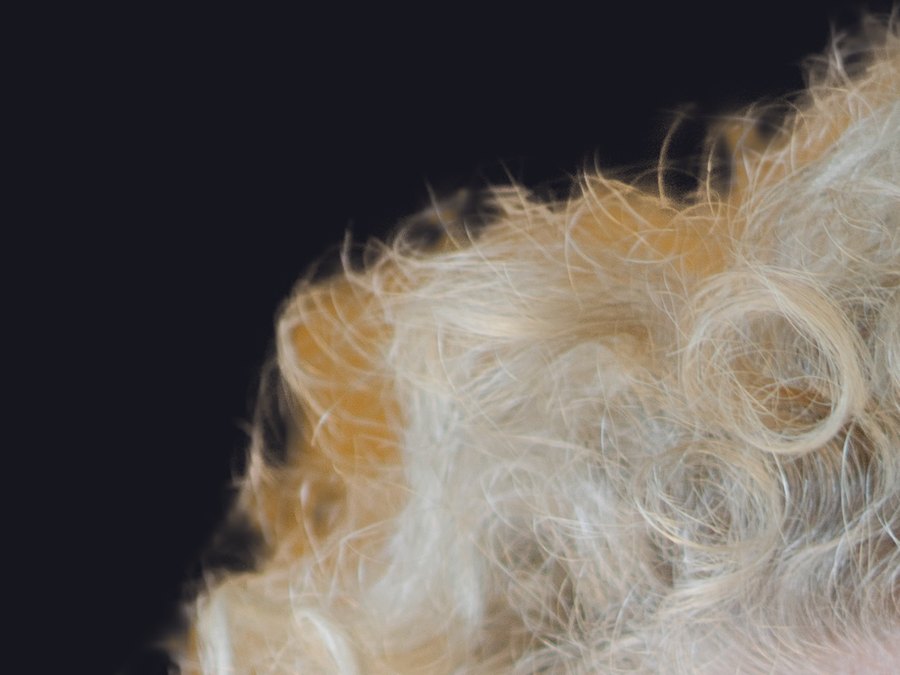
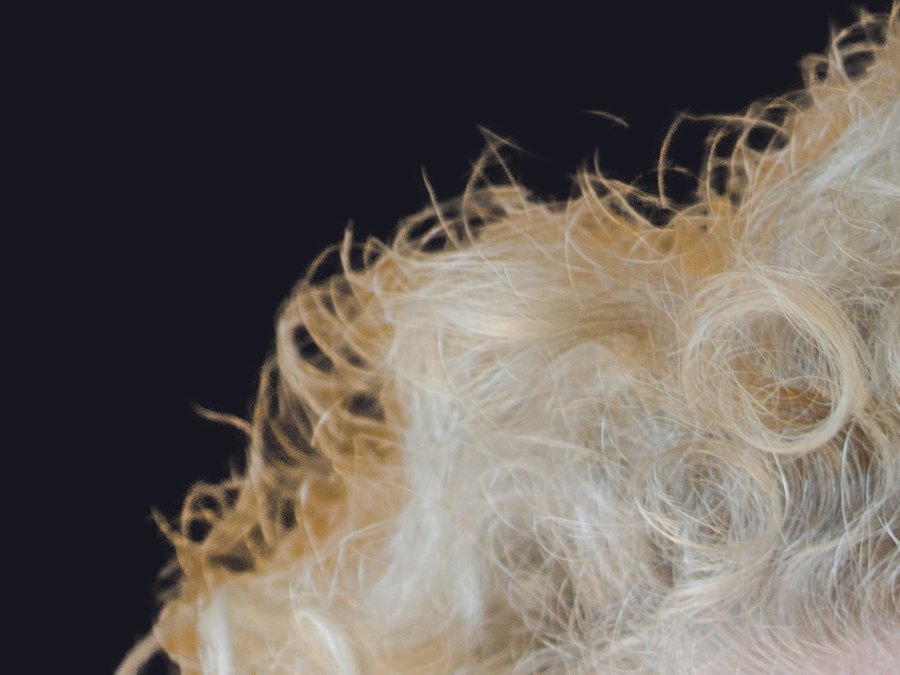
A single pass over a large photo can't see individual strands, so it leaves a soft blob with scraps of the old background caught in it.
On big photos BGpeel goes back over the edges at full resolution and keeps only what agrees with the whole picture. Stray hairs come back, the leftover background goes. You see the first result in about a second, and the edges sharpen a moment later.
Close-up from a 36-megapixel portrait, shown on a dark background.
The flow you know from remove.bg, minus the sign-in, the upload bar and the credits.
One photo or a whole folder. Paste from the clipboard works too. JPEG, PNG, HEIC, TIFF and WebP.
The subject stays, the background wipes away. Flip between Original and Removed, or preview it on any colour.
A transparent PNG at the photo's full size, in its own colour profile. Or copy it, or drag it straight into another app.
Queue up hundreds of photos and export them all into a folder in one go.
When it keeps too much or too little, paint the fix. Undo and redo included, and edge colours are cleaned again after every stroke.
Semi-transparent edges are recoloured to the subject's own colour, so there's no halo of the old background on a new one.
| BGpeel | remove.bg and other online tools | Finder's Quick Action | |
|---|---|---|---|
| Your photos stay on your Mac | ✓ | Uploaded to a server | ✓ |
| Works without internet | ✓ | — | ✓ |
| Full-resolution results | ✓ | Usually paid per image | ✓ |
| Second pass for hair and fine edges | ✓ | Varies | — |
| Erase and Restore touch-ups | ✓ | Some | — |
| Compare with the original, preview on colours | ✓ | Some | — |
| Price | $9.99 once | Credits or a subscription | Free |
Client work, product shots before a launch, family photos: none of it should need to pass through someone else's server.
The whole engine runs on your Mac's own graphics chip. There is no server to send a photo to.
No sign-up, no email wall, no usage tracking. You enter a license key once and that's it.
BGpeel checks your license key now and then. That's its only connection, and it keeps working offline for weeks.
The earlier you buy, the less you pay. The price goes up as each launch batch sells out.
20 of 20 left at this price
macOS 14 Sonoma or later · Apple silicon (M1 or newer) · 450 MB download
Secure checkout by Dodo Payments. Your license key shows up the moment you pay and arrives by email too. All sales are final.
No. BGpeel is an independent Mac app and has no connection to remove.bg. It does the same job, removing the background from a photo, but on your own computer instead of on a server, and for a one-time price instead of credits.
No. The model that finds your subject is inside the app and runs on your Mac. The only thing BGpeel ever sends over the internet is your license key, to check it's valid.
Any Mac with Apple silicon (M1 or newer) on macOS 14 Sonoma or later. Intel Macs aren't supported. While it's working, BGpeel uses about 2.5 GB of memory, and gives it back a few minutes after you stop.
On people, pets, products and objects with a clear subject, results look like the gallery above, which is unedited output. It is weakest where every background remover is weakest: glass, smoke, veils, and scenes with no obvious subject. For the occasional miss there are Erase and Restore brushes.
There's no demo version of the app. That's why the gallery on this page is raw output and includes awkward cases like spokes and whiskers, so you can judge the quality before you buy. All sales are final.
A transparent PNG at the original photo's full size, with its colour profile kept. You can download it, copy it, save it somewhere specific, or drag it into another app. Your original file is never changed.
The largest we've tested is 54 megapixels. A typical photo takes about a second; on large photos the detail pass for hair and fine edges adds a few seconds, and you can turn it down or off in Settings.
No. You pay once and it's yours, including every 1.x update. There are no credits and no per-image charges.
Up to three at a time. You can deactivate one in Settings to move the license to another Mac.
On the page you land on right after paying, and in the email from Dodo Payments. Lost it? Write to support@ahmedgagan.in.

20 of 20 left at this price